Replenish Every Store With a Transfer Your Team Can Act On

Stockadoodl is the Shopify replenishment app for merchants running 2+ locations. Set a threshold once, and get alerted with a transfer already pre-filled — reviewable, editable, and ready for your team to pick accurately. No more spreadsheets or manual cross-referencing.

Moving off Stocky? Set min/max once and get a pre-filled transfer when a store runs low.

Install Stockadoodl
Plans from $9.99/month · Free trial available · Every transfer stays editable until you create it.

Why Stockadoodl?

Deciding what each store needs and turning it into a transfer shouldn't eat up your afternoon. Stockadoodl watches your stock levels, tells you when a store is running low, and hands you a transfer with a suggested quantity already filled in — so you're reviewing a recommendation, not building one from scratch.

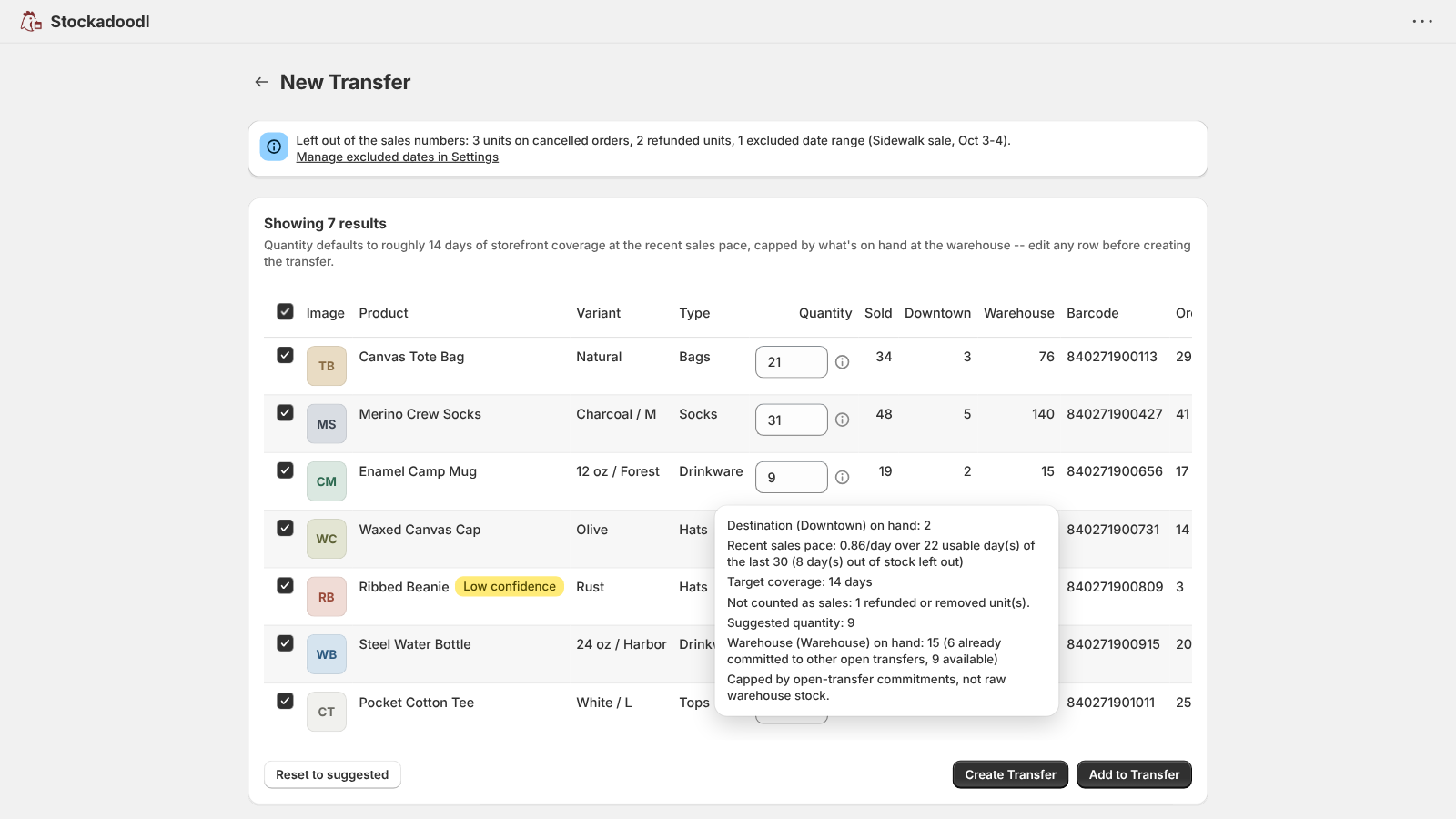
Suggested quantities account for what's on hand at your source location and stock already committed to other open transfers — never more than what's actually available to send. You can always edit the quantity before anything is created.

How it works

  1. Install Stockadoodl and set a min/max threshold for the products and locations you track.
  2. Get alerted by email or Slack when a store drops below it, or get a daily or weekly digest — either way, the transfer quantity is already suggested.
  3. Or build one on demand anytime: open Apps → Stockadoodl, filter by location, date, or product type, and click Fetch Products.
  4. Review the suggested quantities and adjust anything before you commit.
  5. Choose Create Transfer or Add to Transfer.
  6. On Pro, send your team a picker link so they can scan and verify the transfer accurately — or print a pick list directly.
  7. When it arrives, record what was received — accepted, shortage, or damaged — and let the Exceptions page flag anything that doesn't add up.
  8. If a warehouse itself is running short, the Reorder page shows what to buy, based on sales pace and your supplier lead time.

Features that keep replenishment moving

Know what needs to move

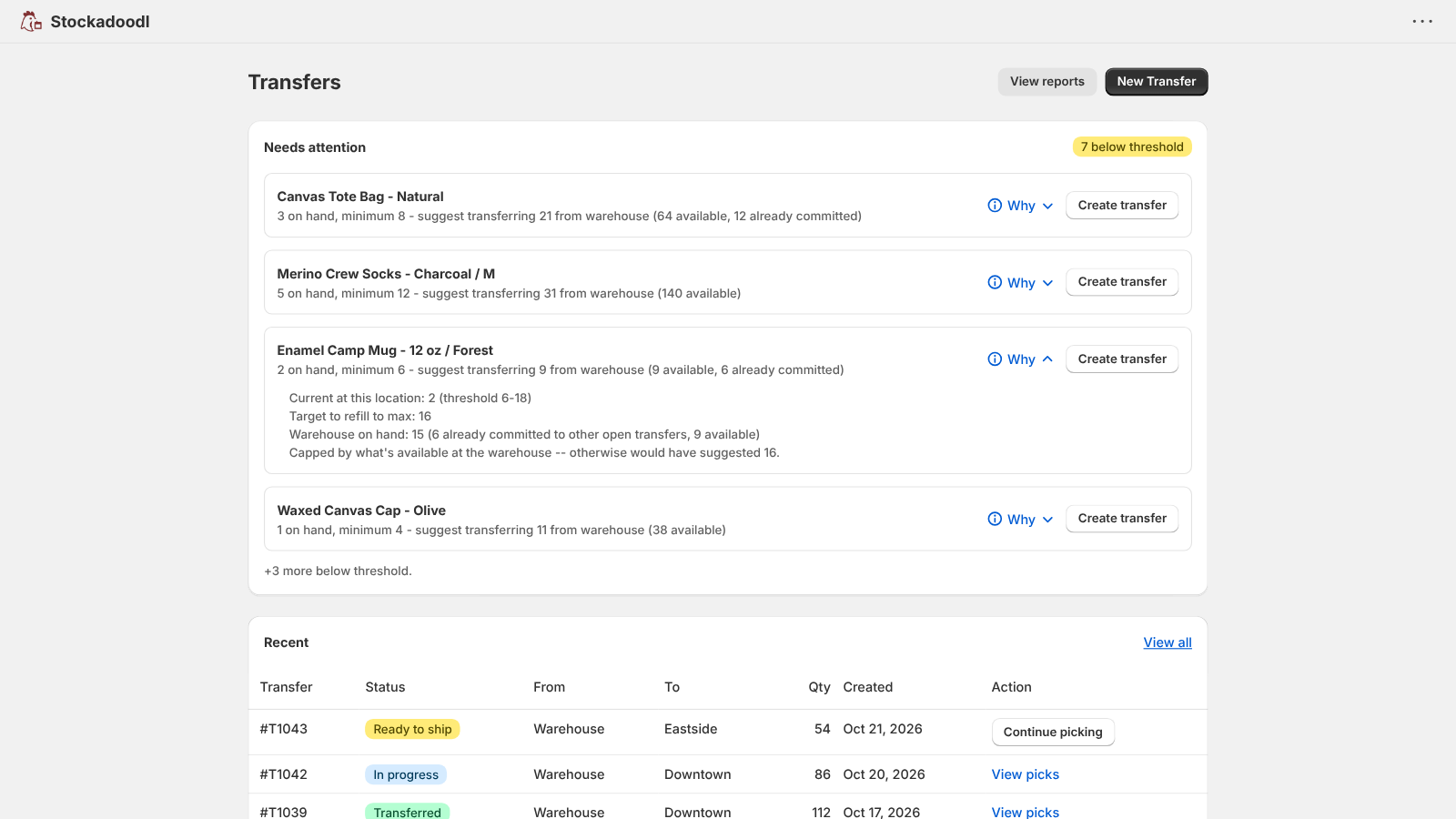
Threshold alerts

Set a min/max once per product and location. Get notified by email, Slack, or both the moment a store drops below it — instantly, daily, or weekly.

Suggested transfer quantity

Every alert arrives with a quantity already suggested, capped at what's on hand at the source and net of stock already committed to other open transfers.

Suggestions you can check

A “Why this quantity?” breakdown on every suggested line, a Low confidence flag when sales history is thin, plus your own target coverage days and warehouse reserve so a suggestion never offers your last units.

Replenishment digest

An optional daily or weekly look ahead at what's below its minimum or about to be, with the reason beside each item and what changed since last time. Every item links to a pre-filled transfer for you to review — the digest never creates one. Pro includes suggested quantities.

A cleaner sales signal

Sales pace leaves out cancelled orders and refunded units, and you can exclude dates — a closure or a one-off promotion — so they don't skew suggestions.

Bulk threshold rules

Set a coverage-day floor and ceiling once and apply it across every SKU and location, or export thresholds to CSV, edit them in a spreadsheet, and re-import.

Flexible filters

Filter by location, date, product type, tags, or stock status to build a transfer on demand, anytime.

Create the transfer

Real Shopify transfers

Creates an actual Shopify inventory transfer — not just an alert or a report. “Create transfer” on a threshold alert opens it already filled in, and you can add to an open transfer or mark one ready to ship right from the Transfers page.

Print & export

Generate clean transfer documents and pick lists for your team, or export a pick list to XLSX.

Pro: give your team a guided pick list

Sales-velocity suggestions

Suggested quantities based on recent sell-through pace, not just a static threshold — and sales pace ignores days an item was out of stock, so a stockout doesn't make a product look slower than it is.

Scan-based picking

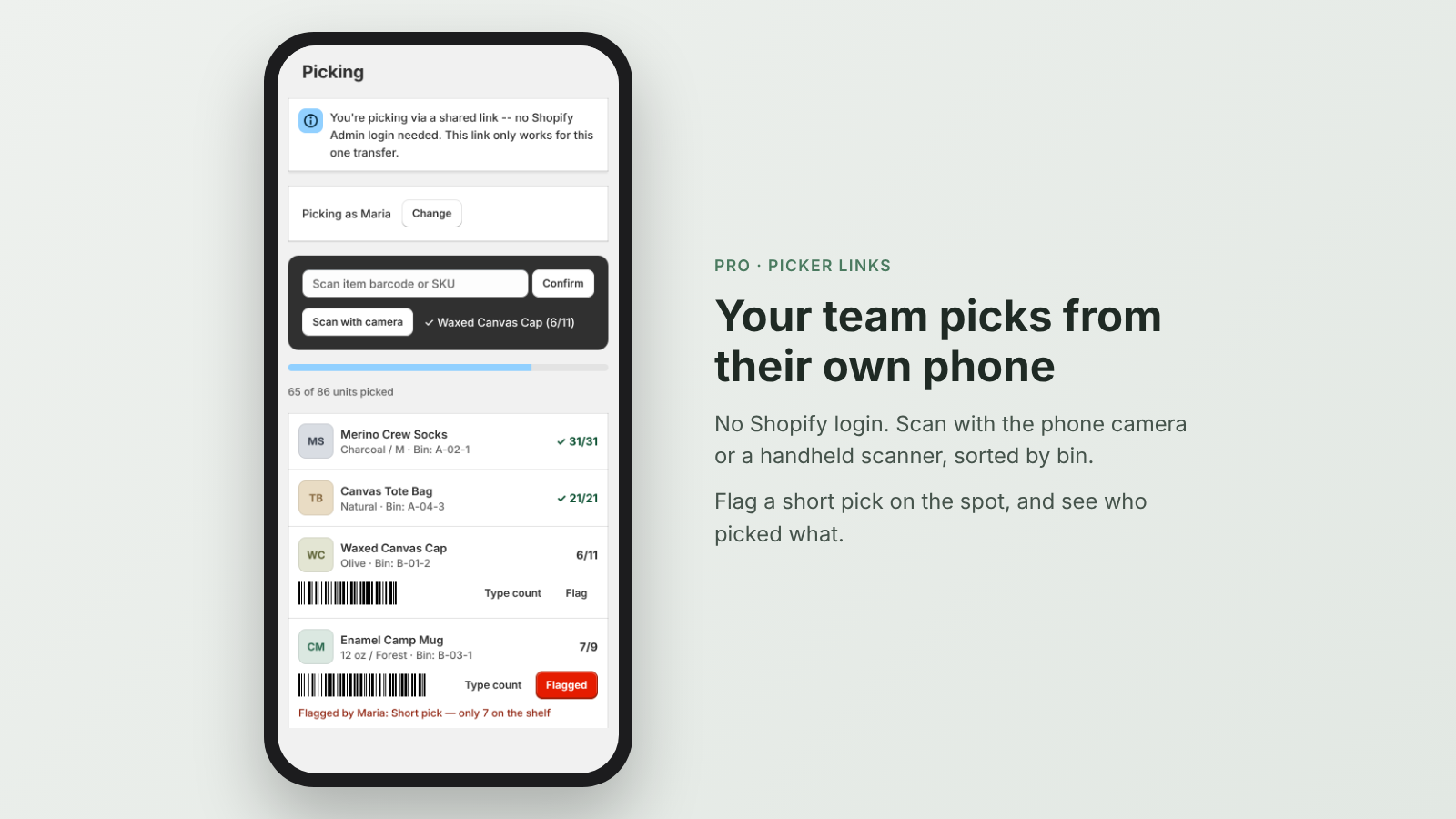
A guided pick list your warehouse or store staff can scan through on a phone or tablet, sorted by bin location, with optional location-scan mode and a quantity shortcut for full shelves.

Shareable picker links

Send a link to staff for one transfer at a time — no Shopify Admin access required, with working camera scanning on their phone. Links expire automatically (3 days by default) and can be revoked anytime.

Staff attribution & exceptions

Add your team with optional PINs to see who picked what, and flag short picks, damage, or miscounts before the transfer ships.

Close the loop

Receiving & reconciliation

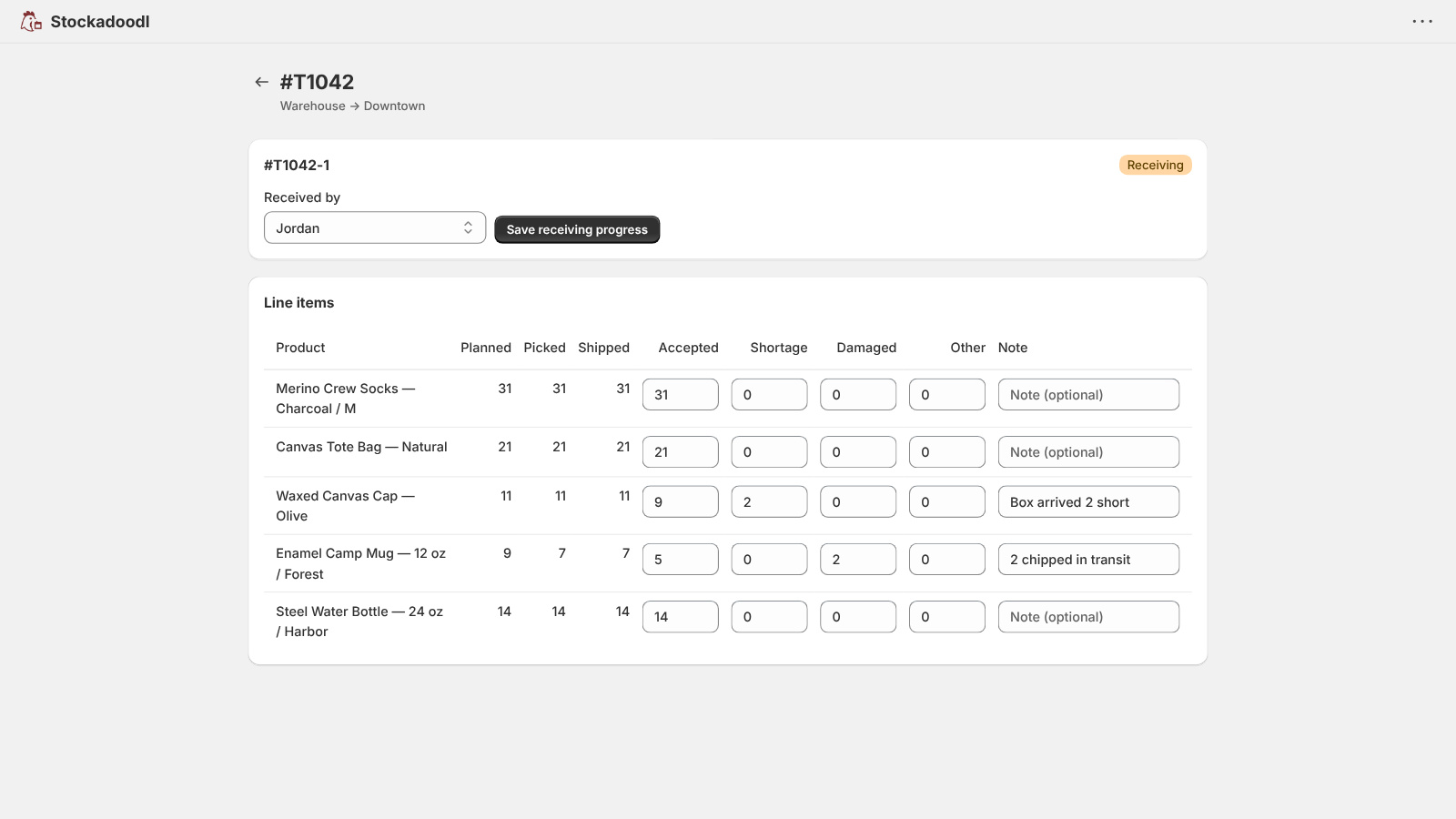
Record what actually arrived on a transfer — accepted, shortage, damaged, or other, line by line — from the pick session or Reports. Progress saves as you go.

Inventory exceptions

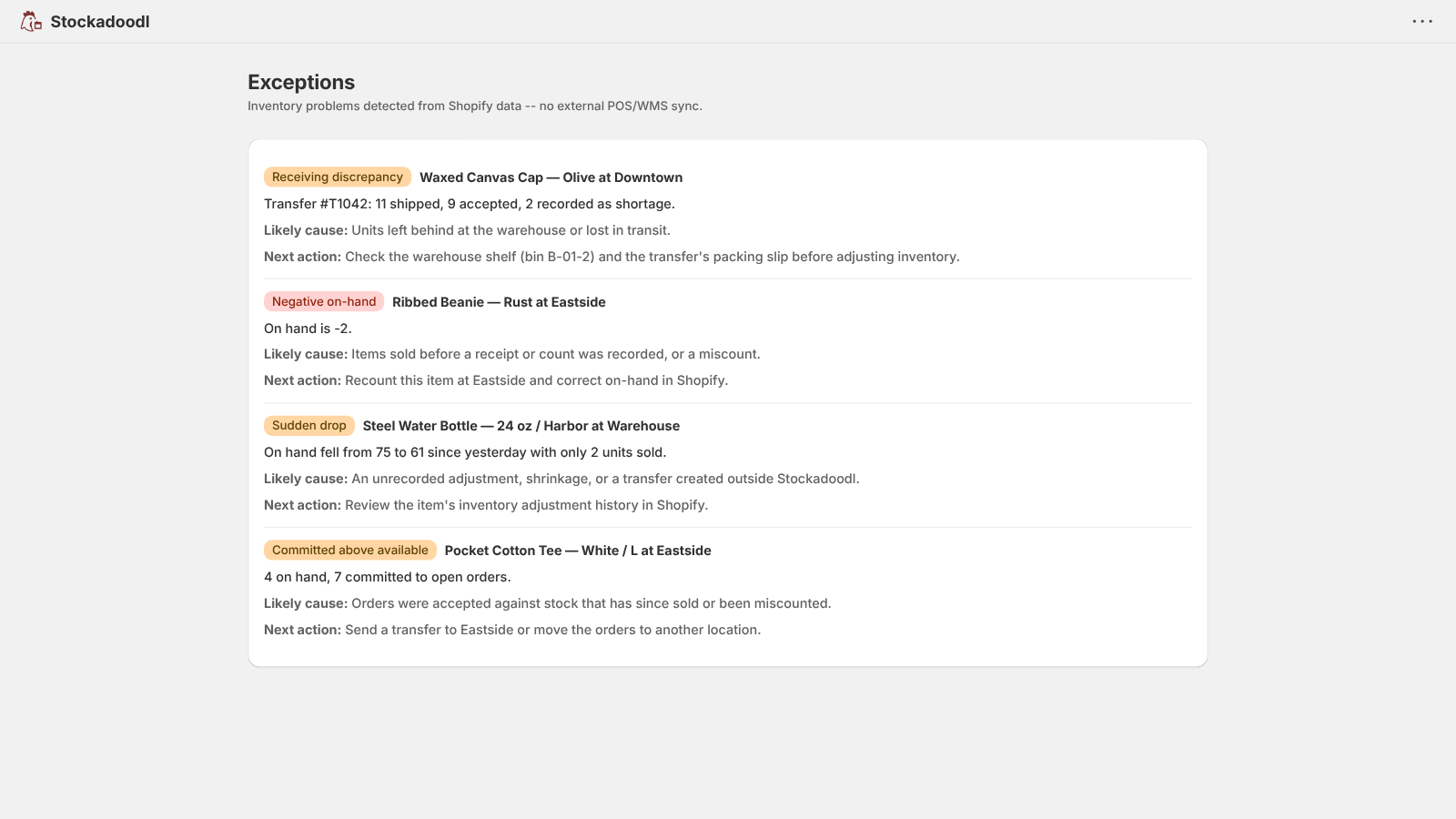
An Exceptions page flags negative on-hand, over-committed stock, sudden inventory drops, and receiving discrepancies, each with a likely cause and a next step.

Reorder suggestions

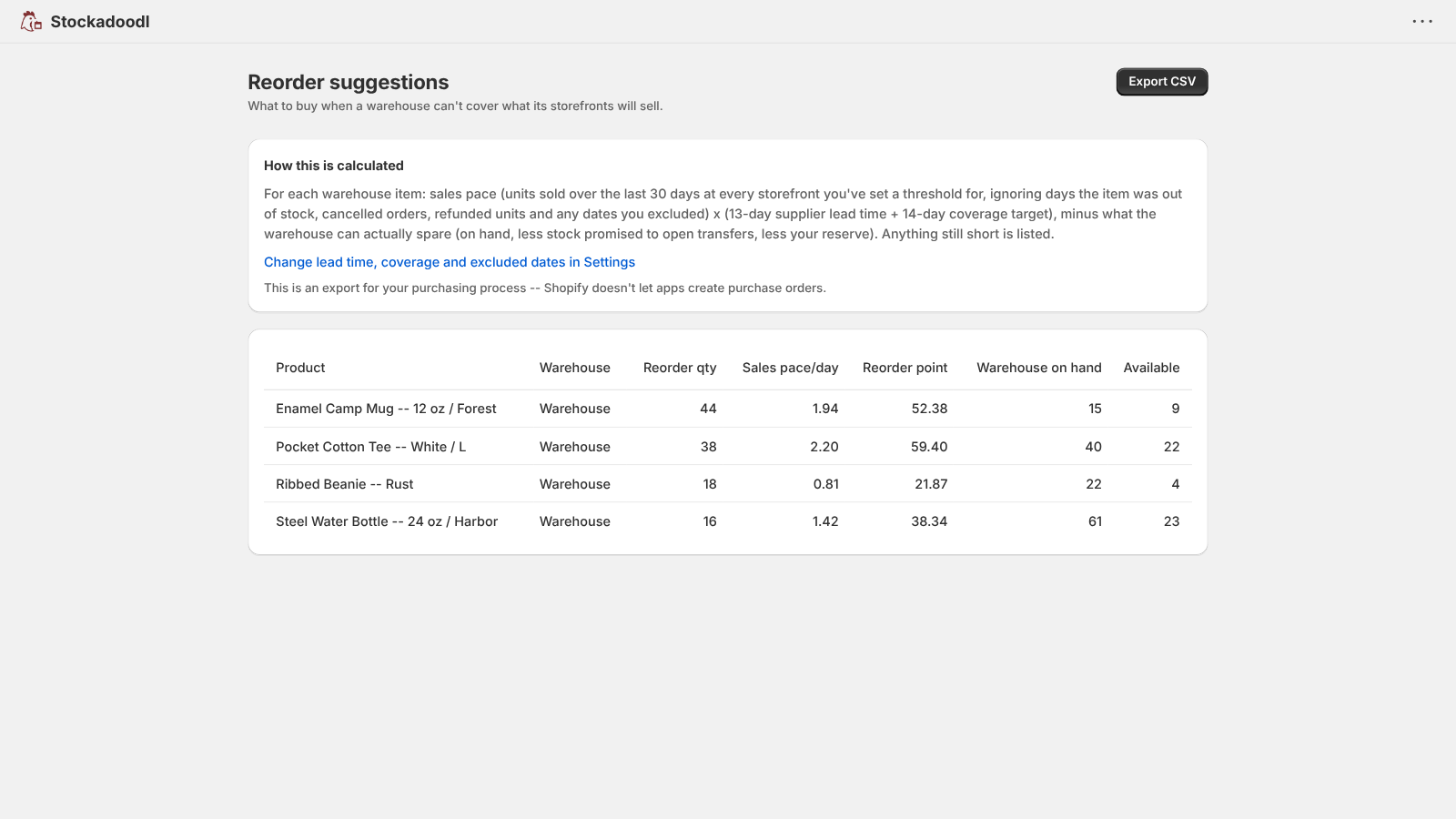
When a warehouse can't cover storefront demand, a Reorder page lists what to buy based on sales pace, your supplier lead time, and a coverage target — exportable to CSV for your purchase order.

Reports & history

Your full transfer history with real pagination, volume stats for the last 7 and 30 days, and a Receiving card showing how much of what you sent has been processed.

Plans

Both plans create real Shopify transfers with suggested quantities, and both include receiving, exceptions, and reorder suggestions. Pro adds sales-velocity suggestions and the guided picking workflow above.

Standard — $9.99/mo

  • Threshold alerts by email or Slack (instant, daily, or weekly)
  • Daily or weekly replenishment digest
  • Excluded dates for closures and promotions
  • Suggested transfer quantity, capped at on hand
  • Creates real Shopify transfers
  • Bulk threshold rules, CSV export & import
  • Receiving & discrepancy tracking
  • Inventory exceptions page
  • Reorder suggestions with CSV export
  • Filterable transfer history & reports
  • Print-ready pick lists

7-day free trial

Pro — $19.99/mo

  • Everything in Standard, plus:
  • Sales-velocity suggested quantities
  • Auto-suggested quantity the moment a threshold breaches
  • Stockout-aware sales pace
  • Suggested quantities in the digest
  • Guided, scan-based picking for your team
  • Shareable picker links — no Shopify login needed
  • Bin-sorted picking, staff PINs & pick exceptions

7-day free trial

Plans are managed and billed through Shopify.

What gets easier

Skip the manual build

Review a suggested transfer instead of assembling one from reports and spreadsheets.

Prevent stockouts

Get alerted before a store actually runs out, not after.

Execute accurately

Pro's guided picking keeps what ships in sync with what was actually picked.

Close the loop

Record what actually arrived and catch discrepancies instead of trusting that a transfer landed as sent.

No bottlenecks

No plan limits on products, variants, locations, or transfers.

What's new

I ship improvements to Stockadoodl regularly. Here's the latest.

A replenishment digest, and a cleaner demand signal

v2026.10.07 · October 7, 2026
  • Replenishment digest — an optional daily or weekly look ahead at items below their minimum or about to drop below it, with a reason beside each suggestion (the warehouse can't cover it, very little sales history) and a summary of what changed since the last one. Turn it on in Settings → Notifications.
  • Reviewed, never automatic — every item in the digest links to a pre-filled New Transfer for you to review. It never creates a transfer, and it goes by email, Slack, or both.
  • Cleaner sales pace — cancelled orders are now left out, and “Why this quantity?” and Reorder tell you when refunded units or cancelled orders were left out.
  • Excluded dates — leave a closure or a one-off promotion out of sales pace in Settings so it doesn't skew suggestions.

Threshold alerts in Slack

v2026.10.06 · October 6, 2026
  • Slack delivery — send threshold alerts to a Slack channel instead of, or as well as, email. Add an Incoming Webhook for your channel in Settings → Slack and Stockadoodl posts a test message to confirm it works.
  • Your choice of channel — pick Email, Slack, or both under “Send alerts via.” Your alert frequency (immediately, daily, or weekly) applies to Slack the same way, and each message links straight to Needs attention.
  • Never silently lost — if Slack stops accepting messages (a removed webhook or archived channel), Settings says so and your alerts are sent by email until you fix it.

Receiving, inventory exceptions, and reorder suggestions

v2026.10.05 · October 5, 2026
  • Receiving — record what actually arrived on a transfer (accepted, shortage, damaged, or other, per line) from the pick session or Reports. Progress saves as you go.
  • Exceptions page — flags negative on-hand, over-committed stock, sudden inventory drops, and receiving discrepancies, each with a likely cause and next step.
  • Reorder page — lists what to buy when a warehouse can't cover storefront demand, using sales pace, your supplier lead time (in Settings), and a coverage target. Export it as CSV.
  • Stockout-aware sales pace — sales pace now ignores days an item was out of stock, so a stockout no longer makes a product look slower than it is. Daily inventory snapshots power this and start building history from the day it shipped.

Picker links expire automatically, clearer Pro-only labeling, and a fuller Reports history

v2026.10.04 · October 4, 2026
  • Picker-link expiry — shareable picker links now expire automatically after 3 days by default, instead of staying valid until manually revoked. Set your own default in Settings → Picking.
  • Clearer Pro labeling — “Target coverage (days)” in Settings only ever shaped Pro's sell-through-pace suggestion, so it's now disabled with an explanation on Standard instead of silently doing nothing.
  • Full Reports history — transfer history is no longer capped at the 100 most recent transfers, with real pagination, and overview stats (last 7/30 days, units moved) now use your full history.
  • Receiving card on Reports — see how many in-progress transfers have started arriving at their destination, and roughly how much of what you sent has been processed so far.

Configurable suggestions, and one-click transfers from Needs attention

v2026.09.30.3 · September 30, 2026
  • One-click transfers — “Create transfer” under Needs attention now opens New Transfer with that item, its locations, and the suggested quantity already filled in — still fully editable.
  • Target coverage — set your own coverage (in days) for suggested transfer quantities instead of the fixed 14-day default, in Settings under Transfer suggestions.
  • Warehouse reserve — set a reserve so suggestions never offer to send your last units off the shelf, applied to both New Transfer and the threshold-breach suggestion.

Smarter, more transparent transfer suggestions

v2026.09.30.2 · September 30, 2026
  • Committed stock — suggested quantities now account for stock already committed to your other open transfers from the same warehouse, so you're never shown more than what's truly available to send.
  • “Why this quantity?” — a breakdown on every suggested line showing how a number was calculated, including sales pace, target coverage, and warehouse availability.
  • Low confidence flag — New Transfer now flags products with very little recent sales history or that were added recently, so you know when to double-check a suggestion.
  • Threshold alert emails now link straight to the items that need attention instead of the general Shopify apps page.

Interactive picking for transfers (Pro)

v2026.09.30 · September 30, 2026
  • Interactive picking — pick transfers right from Stockadoodl with a scanner-first view, live progress, bin-sorted order, and per-item exception flagging (short pick, damaged, miscount, and more).
  • Bin-location sort — set a product metafield for bin or aisle in Settings and pick lists sort in that order automatically.
  • Staff and PINs — add your team on the Team card in Settings so a pick session is attributed to whoever's actually picking.
  • Location-scan mode — optionally require pickers to confirm the bin before scanning items in it.
  • Quantity shortcut — pick a full shelf's worth in one count instead of scanning one at a time.
  • Export and print — export a pick list to XLSX or print it, with barcodes, bins, and product images included.
  • Shareable picker links — hand a link to warehouse staff to pick from their own phone, no Shopify login required.
  • Mark ready to ship — do it right from the Transfers page, so a newly created transfer doesn't need a trip to Shopify's own Transfers admin page before it's pickable.

Thresholds, alerts, reports, and a reorganized app

v2026.09.28 · September 28, 2026
  • Thresholds — set a min/max per product and location on the new Thresholds page; Stockadoodl flags anything below its minimum on the Transfers page with a suggested quantity based on recent sell-through.
  • Email alerts — turn them on in Settings to be notified when something drops below threshold, instead of having to check.
  • Run-rate suggestions — suggested transfer quantities now project forward from actual sales velocity over your selected date range, instead of just matching what already sold.
  • Reports — a new Reports page with transfer volume stats and a full, filterable history.
  • Help — a new Help page walking through creating a transfer, thresholds & alerts, and reports.
  • Bulk threshold rule — set a coverage-day floor and ceiling once, then apply it across every SKU and location at once.
  • Threshold CSV import/export — pull every SKU that needs a min/max update into a spreadsheet, edit it, and re-import to apply the changes in bulk.
  • A reorganized app — Transfers (home), New Transfer, Thresholds, Reports, Settings, Help, and What's new, instead of one long page.

FAQ

How long does setup take?

A few minutes. Install, then set thresholds: apply one bulk coverage-day rule across every SKU and location, or import min/max values from a CSV. Anything below its minimum shows up on the Transfers page right away. Stockadoodl works with your existing Shopify locations and transfers.

Does this work with multiple Shopify locations?

Yes — Stockadoodl is built specifically for multi-location merchants. Thresholds and alerts pair each store with the warehouse or stockroom that refills it, and New Transfer lets you build a transfer between any two locations on demand.

Is Stockadoodl a Stocky alternative?

For moving stock between locations, yes. Shopify retired Stocky on August 31, 2026. Stockadoodl covers the replenishment side: set min/max per store (or import them by CSV), get a pre-filled Shopify transfer when a store runs low, pick it, and record what arrived. It doesn't do purchase orders — Shopify's own purchase orders handle that now, and Stockadoodl's Reorder page gives you the list to take to them.

Does Stockadoodl create transfers automatically?

No — on purpose. A pre-filled transfer is waiting for you in your daily or weekly digest, in your alerts, and under Needs attention. Review it and create it in one click. Nothing moves stock you haven't looked at.

How do threshold alerts work?

Set a min/max quantity once per product and location. When a store's stock drops below the minimum, Stockadoodl alerts you by email, Slack, or both, with a transfer already pre-filled with a suggested quantity — you still review and create it yourself.

How do I transfer inventory between locations in Shopify?

Let a threshold alert start it for you, or build one on demand: select your locations and filters, fetch products running low, review the suggested quantities, then create a transfer in one click.

Can I add products to an existing transfer?

Yes — select your products and quantities, then choose Add to Transfer to append to an existing Shopify inventory transfer.

Does Stockadoodl help my team pick the transfer accurately?

On Pro, yes — generate a guided, scan-based pick list and share it with staff via a link that doesn't need its own Shopify Admin login. Pick progress and any flagged exceptions are attributed to whoever picked them.

How much does Stockadoodl cost?

Standard is $9.99/month and Pro is $19.99/month, both with a 7-day free trial. Both plans create real Shopify transfers with suggested quantities and include receiving, exceptions, and reorder suggestions; Pro adds sales-velocity suggestions and guided team picking. Plans are managed and billed through Shopify.

Can I track what actually arrived on a transfer?

Yes, on every plan. Record each line as accepted, shortage, damaged, or other — from the pick session or from Reports — and Stockadoodl's Exceptions page flags receiving discrepancies alongside other inventory problems like negative on-hand or sudden drops.

Does Stockadoodl tell me what to reorder from suppliers?

Yes — when a warehouse can't cover what its stores need, the Reorder page lists what to buy using sales pace, your supplier lead time, and a coverage target, and exports to CSV. It doesn't create purchase orders in Shopify; you take the list to your supplier or purchasing tool.

Can I print or export transfers?

Yes — generate clean, printable transfer documents your team can use on the floor or in the warehouse. Pick lists can also be exported to XLSX, and thresholds and reorder lists export to CSV.

What's the difference between Stockadoodl and Shopify's built-in transfers?

Shopify's own transfer tools have grown: transfers support partial receiving and barcode scanning, and stock counts now live in the admin. Shopify's transfer screens don't work out what each store needs or how much to send from per-store min/max rules — Stockadoodl does, from your thresholds and sales, and hands you a real Shopify transfer already built from that recommendation. Shipping and receiving transfers in Shopify POS also needs POS Pro at each location; Stockadoodl doesn't need POS Pro: staff pick from a phone browser through a picker link (Pro) with no Shopify login, and receiving happens right in the Stockadoodl app.

Ready to let Stockadoodl build the next transfer?

Set your thresholds, review the first suggestion, and see what your team thinks.

Install Stockadoodl

Plans from $9.99/month · Free trial available